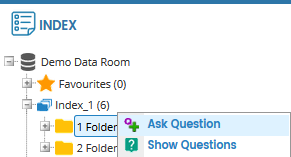
Right-click on an index/folder/document and click Ask Question.
CREATE QUESTION pop-up window will appear.
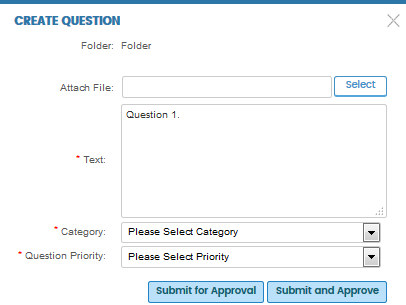
Enter the question in
the Text box.
Note: You can also attach one reference document using
the Select button next to the Attach File
box.
Choose the Category and Question Priority, and then click Submit for Approval.
Once submitted, the question will be sent to the Bidder Moderator for approval.
The status of the question will be Draft Question.
Note: Bidder Q&A Participant with Q&A Moderator role can opt to click Submit and Approve instead. This means that the question will be submitted and approved at the same time.
You will receive an e-mail alert once your question is approved by the Bidder Moderator and also when your question is answered by the Deal Team.
To view the questions and answers available in the data room, go to the Q&A tab and click the View button next to All Q&A activity.